Each year, Google changes its search algorithm over 600 times. Each
year, there are more updates than a year before. 2015 was a
rollercoaster for marketers who were trying to keep up with Google… and
we can expect much more yet to come in 2016.
While many of these changes are minor, Google occasionally rolls out a
major algorithmic update (such as the Hummingbird) that affects search
results in significant ways.
Is your SEO strategy up to scratch for 2016?
This very question will be floating around the offices of many small
to large businesses as we head into an ultra-competitive (and
ultra-technological) era in organic search. Are you ready?
As always, it pays to keep on top of the latest trends to remain ahead of the curve. So I teamed up with Sam Hurley, who is the head of search at Midas Media in the UK, to write this article to explore how to stay in front of Google as it evolves at a light speed.
Let’s get in gear and dig into the most important shifts in Google
shaping the landscape for search marketers in 2016 and beyond.
Featured Snippets: Be the Answer
Remember the days when Google search would retrieve ten blue links to
websites? SEO was more straightforward then. Keywords in content, meta
data, and inbound links.

Today, blue links to websites are giving way to the Knowledge Graph (their very own
colossal vault of information). It’s a much more complex territory. Google no longer thinks of itself as the middleman. Google wants to be “the answer.”

As
part of Google’s Knowledge Graph, Answer Boxes have become a prominent
feature in the new Google SERPs (search engine result pages).
This is Google’s reaction to our ever-decreasing attention spans
and growing expectancy of everything ‘instantaneous.’ Google measures
success by how quickly they get the user from question to answer.
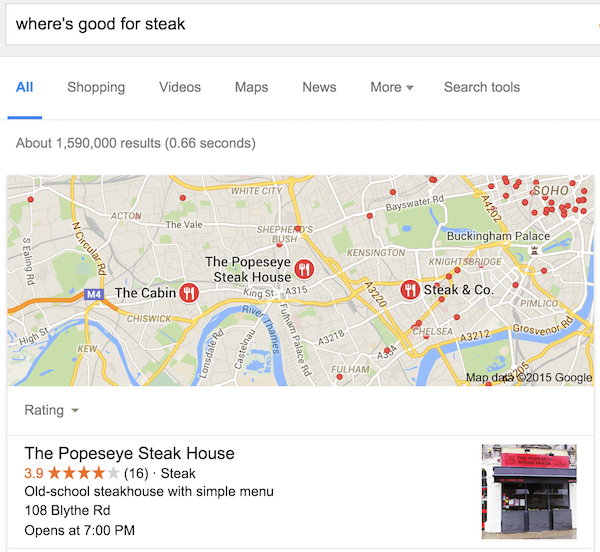
The more real-estate you can obtain on the SERPs; the better. It means showing up in Answer Box results is now a critical component of any SEO strategy.

The
optimal search marketing objective for your most profitable keywords in
2016 should be to own top positions in AdWords result, a position #1
Direct Answer Box, a local listing, a standard organic listing in top
position followed by further box results lower down the page. You should
also show up in images, videos, Twitter feed, Knowledge Graph, and
maps, which are the features Google is increasingly displaying in search
results.
You need to look beyond your website if you aim for complete
domination of the search results in 2016. As Pete Meyers of Moz pointed
out, SEO in 2016 is about ‘being the answer.’
Feed the
Hummingbird by using schema markup to increase the changes of better indexation by Google.

Today,
many featured snippets in Google require a more elaborate content
strategy. Here’s a relatively new, accordion-like development of the
Answer Box called “People also ask”:

Using
keyword research tools,
you can craft your writing in a way which answers these questions
succinctly yet leads the searcher to more detailed information. Over
time, Google should acknowledge and select your results over the
competition, while your cliff-hanger Answer Cards can attract more
clicks.
In case you want to learn more about how to optimize for the featured snippets, here’s an insightful video from Moz;
Optimizing for The Knowledge Graph.
RankBrain: Machines are Taking Over
“Machine
learning is a core transformative way by which we are rethinking
everything we are doing,” said Google’s Chief Executive Officer
Sundar Pichai on the company’s earnings call.
RankBrain
is Google’s new machine-learning algorithm with artificial intelligence
at its core, which better interprets search queries and learns from
each action taken by searchers. In 2015, “a very large fraction” of the
millions of queries a second that people type into the Google’s search
engine were interpreted by RankBrain. The results – according to Google –
were “better than expected.”
For instance: ‘gimme pizza close’ currently returns results for a
kids’ TV show. What if all of a sudden, there was an influx of searchers
entering this query (for example, due to a marketing stimulus) who
wanted takeaway pizza close to their home? RankBrain would measure user
behavior, learn from data, and alter the results to show just that.

Putting it simply, Google is becoming smarter all the time but this Artificial Intelligence has really
turned things up a notch.
Local SEO (on-page and off), schema markup, user experience,
content quality and relevancy are key takeaways here.
Structured Data: Soon a Ranking Signal
John Mueller, Google’s Webmaster Trends Analyst, let it slip that search results with rich snippets
may soon rank higher
This would make sense to Google as it would aid RankBrain in its
perception of results. Google wants the webmasters to implement
structured data so that there is reduced data ambiguity. All the signals
point to increased importance of Structured Data in 2016, so make it
one of the fundamental parts of your
website audit in 2016.
To quickly view how the Structured Data appears on your website, you can use
Google’s Structured Data Tool. Read more about Structured Data on Google’s Develop blog
here.
Mobilegeddon: The Mobile Update
This Google update was set to debunk websites that were not mobile
friendly in mobile SERPs. It produced crazed media-hype but actually
turned out to be something not-so daunting. This update has had rather negligible impact thus far.
Nevertheless, while Google has given website owners ample time to
improve their mobile experience, the honeymoon may soon be over. Expect
search becoming more mobile in 2016, and so you want to stay ahead of
this trend.
Moreover, it is still absolutely critical to own a mobile-responsive website to appease user-experience (another
Google ranking factor) and increase conversions.
If you haven’t made your website mobile yet, you need to. Fast. It’s
the standard of the world we live in; people expect a great mobile
experience at all times and if you can’t offer that, they will leave
your website pronto.

Accelerated Mobile Pages are next on the horizon. It’s the new
open source project
from Google, set to enable web pages to load almost instantly on mobile
devices. Look out for its mainstream release in early this year.
You can use
Google’s Mobile-Friendly Test tool to learn if there are issues with your website.
Secure Web: HTTPS as a Ranking Signal
One of the first questions Google asks when evaluating the quality it’s search results is: “Can I trust this website?”
Similarly to the Mobile Update, the HTTPS update turned out to be
another non-event that marketing blogs built up into frenzy. Webmasters
frantically switched over to HTTPS, the secure version of HTTP, in a bid
to gain the competitive edge. However, not much happened so far.
However, taking note of Google’s shifts
now means better preparation
for the future.
Google may well give the HTTPS another push soon; weighting rank
signals heavily towards HTTPS websites where user data is captured, such
as e-commerce sites.
Switching from unsecure to secure protocol is a large and complex job, make no mistake.
Be sure to weigh it up: if you’re an e-commerce store or apply a
log-in feature, you should be running HTTPS regardless. If you own an
established blog, it may not be worth encrypting just yet. Starting a
website from scratch? Go HTTPS.
Bad Links: Real-Time Penguin Update
Google’s John Mueller (almost) confirmed the real-time algo update will be released in early 2016.
This will be welcomed as a god-send for many webmasters and marketers
feeling the long, drawn-out brunt of the link-based, algorithmic Google
‘penalty’ known as Penguin. Searchmetrics reported that Google has already started rolling out new quality updates in January this year.
The fresh update to Google’s algorithm means more immediate positive
ranking results should ensue if you rectify any detrimental assets i.e.
low quality links, spammy anchor text and ratio of exact match
(providing the rest of your website is solid). There’ll be less waiting
for severe drops in rankings to become elevated.
On the other hand, it will become just as easy to get slapped with an
algorithmic debunk in rankings if you are breaking Google’s
Quality Guidelines, whether you are aware of them or not. Most penalties and filters are automated if your website gets flagged for violation.
Watch your step where links are concerned – now is an appropriate
time to investigate your link profile with a keen eye to ensure there
are no loose ends. Know your risks if you are engaging in old-school
SEO tactics. Google has become very smart in detecting spam.
Check out the actionable link building strategies for 2016 Sam Hurley shared “from experience” in my interview with him on Search Decoder.
Google My Business and Local Results Shake Ups
Aligning mobile search with local results; a Google study indicated that local searches lead 50 percent of mobile visitors to visit stores within one day.
In addition, the rise of voice search means that search queries are more in tune with location now than ever:
The need for local visibility is undeniable and Google have recently made these positions especially coveted…

For example, local search packs in the SERPs now show only three listings instead of seven.
In addition, local businesses have welcomed the new Google My Business, which replaces the failed Google+ Local experiment, and provides a hope for better, integrated management of local listings.
Lastly, Adwords Ads are continually taking up critical room above the
fold on both desktop and mobile devices. On mobile in particular, not
owning a top 3 ad position for a sales-focused query simply means –
you’re not going to get a look in.
Spot the organic:

Businesses
are increasingly confronted with a choice to pay for Adwords if they
attempt to dominate search results and be ‘top of mind’ on their most
important keywords.
Is your SEO set to break or make? What other critical Google changes
are seeing on the horizon that will affect SEO in a major way?

 Source: Search Engine Watch